
When I opened it up I was like a little kid at xmas. It was exactly like I expected it. It felt beefy and solid, it had some weight to it and was a nice size.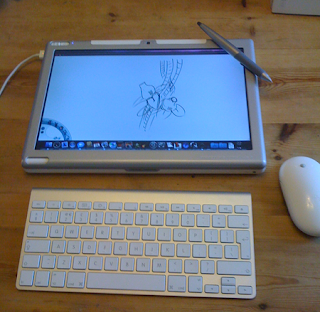
As I am PC based and this runs OSX I first went the route of installing win7 under bootcamp and then using parallels, this would allow me to run my windows apps from inside OSX without rebooting. This sounded like the ideal way to go as I didn't want to shell out for mac versions of the apps I already own for the PC. It didn't work well although the apps ran well on the machine there was no support for windows which meant I didn't get the pressure sensitivity. So I am pretty limited to a few apps that I own that can be run on both mac and PC. So the apps I run on the modbook are cinema 4d, painterX, artrage, photoshop, etc. So how does it work? Good question if I bought it at first with only the default pen ( which does fit inside the case nice) I would have been annoyed as it is cheap and feels... well not very good in the hand. But I have the studio pen and although it is better and much more closer to the wacom pen I am so used to using daily it isn't as nice a feel, it is lighter and to me that makes it not as comfy as the wacom one (imho) but it is 100% better than the default one that ships with the basic modbook. Setting up the modbook was easy click the corners in the setting up mode and off you go. It was that easy. So it was a dream to start painting and controlling the screen with my pen. Drawing and painting feels just right now. I havent noticed any lag, but I have noticed that sometimes the mark does go off to one side so you have to set it up again.

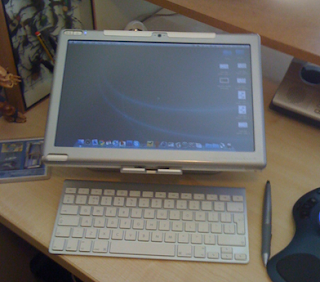
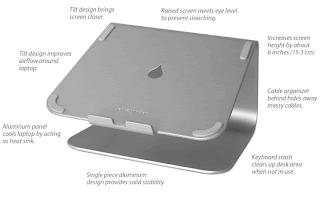
This hasn't happened a lot but worth mentioning. I have also noticed that going to the corners of the modbook isn't really good as sometimes it doesn't see the pen. There has been reports of corner cursor jumping due to the internal magnetic blahblah and poor design. So I am guessing this is the case here, but it doesnt stop me working in any app so I can live with it. The thing that does stop me working is sometimes It doesn't start up by pressing the power button which is recessed on the top left corner, sometimes I really have to press, press and PRESS it and almost come to the begging stage before the lights appear and we are off. Then we have the times when I have begged it to start and when it does start it doesn't see the pen, that is ok that is what the 2nd button on the left is for right. Slide it down and it will reboot their OS pen software, but it doesn't always work and I find myself once again sliding it down over and over till it finally lets it see the pen. BUT I STILL LOVE MY MODBOOK EVEN THOUGH IT TRIES TO F*&K WITH ME. I can also say thank god I got a keyboard with the modbook or I would have pulled my last three grey hairs out. It really cant be operated daily for any length of time without a keyboard even using the companies annoying, pops up every 2 secs friggin writting app (which I had to un-install instantly, well in the first 2 weeks as it was driving me friggin mad). So now I can draw on the move and have full use of a computer so I can check my emails watch a film and paint till I drop. Great. Well not so the design is a little heavy after a while and it does get hot, prob due to the fact that there is a laptop under it :). there are some areas of the case where it feels cheap and poorly put together ( which relates to the issue mentioned above). So yes its great and has its issues not that big to be a show stopper but enough to be noticeable. Do I regret buying it HELL NO. I would recommend buying a keyboard, mouse, studio pen and nice stable stand for your desk. I bought a Mstand by rain design. It is a well designed rock solid stand and lifts and tilts the modbook just enough for it to become a little drawing board on my desk.
Would I recommend a Modbook to someone else, yes and no. There are those that will use and abuse the modbook till it has died of old age. These peeps would kill a wacom from over use. If you draw, paint and use a wacom pen for work more than 6 days a week then why wouldn't you want a modbook, plus they would make it work for its money and it would soon be paid back. It is a lot of money for sure and they are talking about bringing out a pro version with a macbook pro inside. Now this is more money and the case is Aluminium and looks like it has solved some design issues, ( basically it looks like they have took more than 15 mins to design and mod it unlike the 5 mins it took them to do the modbook ( ok ok it aint that bad and ive seen it on Eureka a few times, but still :)) So it might be a better idea to wait and pay more or keep searching on ebay for a cheap one :). Well thats about it, if I think of anything else I may have missed off or the modbook shows any issue not mentioned here I shall update this post. Basically the modbook is like the Ipads big brother where the ipad is a sexy sister and the modbook is the Ugly fat geeky brother that knows a lot and can do more than his sister (if you get me :) no looks but gets the job done ) Hope this proves interesting to someone. I am not a professional reviewer and only want to share my experiences with these items in order to help someone. Oh final note now I have an ipad and a modbook I keep finding myself trying to use my finger on the modbook which never stops being funny as I to push over an icon with my finger and then going D'oh lol.


